WordPress site में Colorful Text Widgets Add कैसे करें
WordPress site में Colorful Text Widgets Add कैसे करें
हाल ही में एक यूजर ने मुझसे पूछा WordPress site में text widget को more colorful कैसे बनाये?
यदि आप भी अपने साईट के widget सेक्शन में colorful text widget add करने के लिए आर्टिकल की तलाश में हैं, तो आप बिल्कुल सही जगह पर हैं।
आज इस ट्यूटोरियल में, मैं आपको बताऊंगा WordPress site में Colorful Text Widgets Add कैसे करना है?
इसके लिए आपको किसी भी CSS code की आवश्यकता नहीं है। यहां मैं एक प्लगइन का उपयोग करूंगा।
तो चलिए शुरू करते है…
WordPress site में Colorful Text Widgets Add कैसे करें
साईट के sidebar या किसी अन्य widget area में Colorful Text Add करने के लिए सबसे पहले आपको अपनी साईट में एक WordPress plugin install और activate करनी होगी। जिसका नाम Colorful Text Widget है।
इस प्लगइन द्वारा आप अपने Text Widgets को Colourfull और attractive बना सकते है अर्थात Widget Title, Background और Text के लिए Colour सेट कर सकते है ताकि visitors इसपर अधिक ध्यान दे सकें।
Plugin को activate करने के बाद Appearance >> Widgets पर क्लिक करें। यहाँ आपको Colorful Text Widget दिखाई देगा। आप अपनी WordPress site के किसी भी Widget area में इस Colorful Text Widget को Drag and drop कर सकते है। आप नीचे स्क्रीनशॉट में देख सकते है।
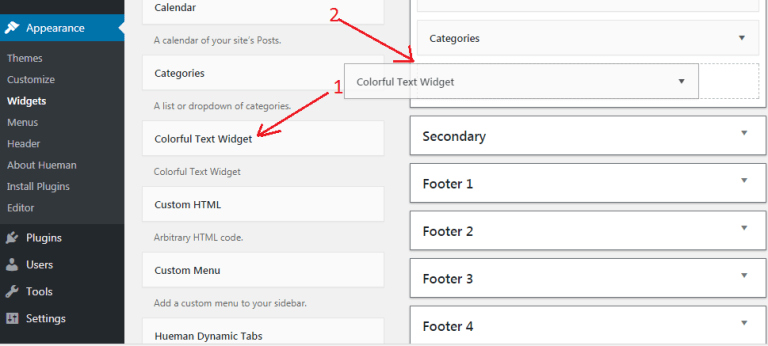
विजेट एरिया में साईट या आप से जुडी इनफार्मेशन जोड़ने के लिए बहुत अच्छा प्लगइन है। यह प्लगइन आपकी information को बहुत attractive और colorful बनाता है।
Conclusion
डिफ़ॉल्ट WordPress widget area बहुत simple और boring दिखता है। यदि आप अपनी कोई भी जानकारी इसमें जोड़ते हैं, तो यह Attractive नहीं दिखता है।
लेकिन Colorful Text Widget plugin विभिन्न Colours के साथ आपकी जानकारी को और अधिक colourful और attractive बनाता है।
मुझे आशा है कि इस आर्टिकल ने आपको WordPress site में Colorful Text Widgets Add करने में मदद की।
अगर यह आर्टिकल आपके लिए helpful साबित हुई है, तो इसे share करना न भूलें!
इसे भी पढ़े,


Comments
Post a Comment